
The "Black-Box Castle" series has already covered Thévenin, Norton, and Kirchhoff — all about <strong>how to simplify circuits</strong>. This installment goes the other way: <strong>how to understand a specific component</strong> — the MOSFET.
A MOSFET datasheet is typically 15–25 pages, but what really decides whether this part will work comes down to a dozen or so parameters and four or five curves. The trouble is these parameters are easy to misread — <code>V_GS(th)</code> looks like the "turn-on voltage," but it is only where conduction barely begins; <code>I_D = 60 A</code> looks like "can carry 60 A," but that is the package limit at <code>T_C = 25 °C</code>; <code>R_DS(on) = 5 mΩ</code> looks great, but that is a typical value at 25 °C with 10 V drive.
This article follows the order of "understand the principle first → calculate losses → then read the datasheet."
The Story: A Floodgate for the Castle
The aqueduct is finished, and Grandpa Copper Nail needs to install a <strong>floodgate</strong> on the main channel to control how much water flows to the watermill.
This gate has four traits:
- <strong>Threshold</strong>: No matter how high the gate is lifted, if it has not passed a certain line (threshold voltage), not a drop gets through;
- <strong>Opening</strong>: Once past the threshold, the higher it lifts, the wider the water path and the lower the resistance;
- <strong>It is heavy</strong>: The gate itself does not leak a drop, but every raise and lower requires hauling a pile of "water" (gate charge) first; the more often it switches, the more effort goes into moving the gate alone;
- <strong>Inertia</strong>: The gate does not open or close instantly — there is a stretch where it both lets water through and blocks it, and all the losses crowd into that window.
These four correspond exactly to the MOSFET's <code>V_GS(th)</code>, <code>V_GS − V_th</code>, <code>Q_g</code>, and the <strong>Miller plateau</strong>.
1. Recognize the Three Terminals First
An N-channel enhancement-mode MOSFET has only three terminals: <strong>G (gate)</strong>, <strong>D (drain)</strong>, <strong>S (source)</strong>, plus a <strong>body diode</strong> hidden inside the package (pointing from S to D, direction fixed by the process — not an optional part).
- <strong>G is the gate</strong>: controlled by an electric field; beneath the gate is an insulating oxide layer, so <strong>in normal operation it draws almost no current</strong> (only the tiny current that charges and discharges the capacitances);
- <strong>D → S is the main water path</strong>: current flows from drain to source (N-channel), and its magnitude is set by how far the gate is opened;
- <strong>Body diode</strong>: the S→D direction always conducts, which also means a MOSFET <strong>cannot fully block reverse current</strong>. In synchronous rectification and motor H-bridges this diode is always working.
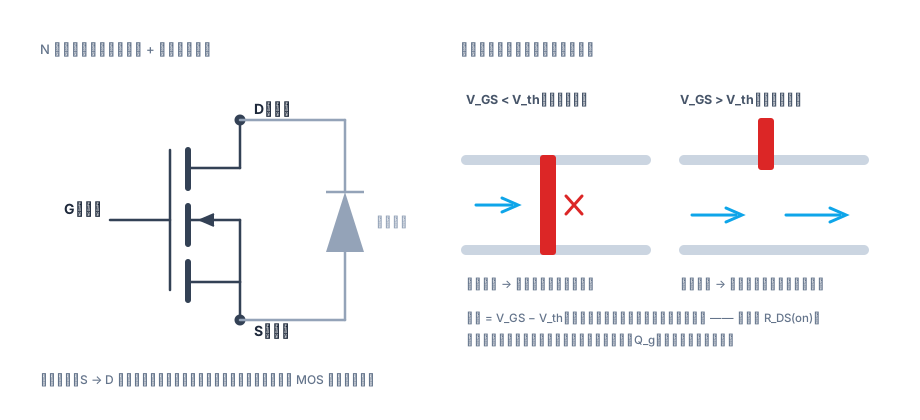
Fig. 1: G is the gate (voltage only, draws almost no current), D→S is the main water path, and the body diode is that one "drain pipe" that can never be shut off.
2. Four Formulas That Hold Up the Whole Datasheet
1. The Threshold: Threshold Voltage
When gate voltage is below , the channel has not formed and the device is off, with only a tiny leakage current. Once exceeds , the extra portion is what actually "does the work":
Remember this one rule and you avoid the most classic misreading: the in the datasheet is the voltage where conduction <strong>barely begins</strong> (test condition is a small current like ), not the "fully on" voltage. Drive a 2.5 V rail with a part whose and it is indeed "on" — but barely: can be ten times higher or more.
2. Linear Region (The Switch's "ON" State)
When , the channel is one complete piece:
When is small (conduction in a switch, drop of only tens to hundreds of mV), the quadratic term can be ignored and it degenerates into Ohm's law:
This is why <strong>higher drive voltage and larger die area mean lower on-resistance</strong>. is set by the process and geometry; the datasheet will not give it to you directly, but it will give you at various — the two are equivalent.
3. Saturation Region (Constant Current, Amplifier Region)
When , further increases in barely change the current (the channel is "pinched off"):
This is the textbook <strong>square law</strong>. is the channel-length modulation coefficient (ideally 0), and it makes the curve tilt slightly upward instead of being flat:
This matters for switching: <strong>the saturation region means "current is no longer controlled"</strong> — during a short circuit or inductor saturation, current is limited only by die area and the external circuit. That is why you need an overcurrent protection window.
4. Transconductance: How Much More Water Flows per Unit of Gate Lift
Large = the same gate-voltage change produces a larger current change = more "responsive" gate control. For switches you look at (smaller is better); for amplifier circuits you look at (larger is better) — two sides of the same parameter.
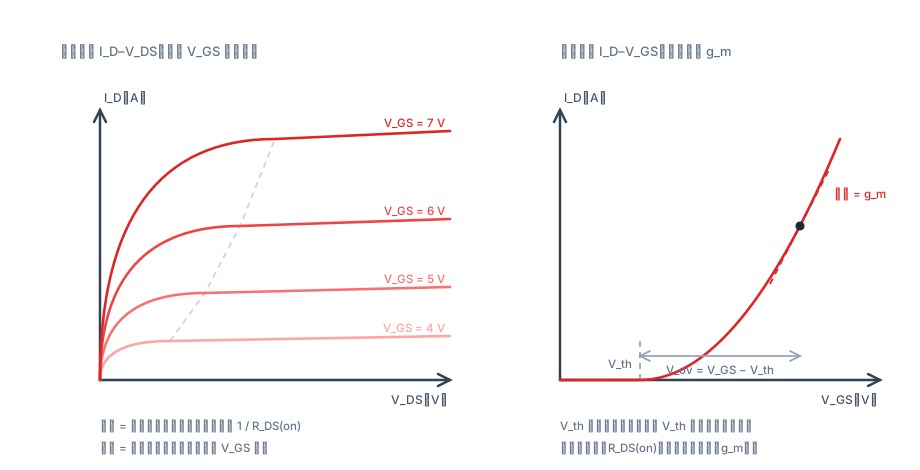
Fig. 2: The left side tells you whether the switch works well (the slope of the steep section is ); the right side tells you how sensitive the control is (the slope is ). The two graphs have completely different x-axes — do not read them as if they were the same.
Two Additional Effects That Are Inconspicuous but Bite
- <strong>Body effect</strong>: when the source potential rises above the substrate, the threshold voltage increases:
High-side devices in H-bridges and circuits with source degeneration resistors hit this — grows, the same gate voltage drives weaker, and on-resistance increases.
- <strong>Temperature coefficient</strong>: <strong>decreases</strong> with temperature (about ), while mobility falls faster with temperature. The result is that <strong>increases</strong> with temperature (about ). The two effects point opposite ways, which is why MOSFETs naturally parallel-share current well (a hotter device has higher resistance and automatically takes less current) — but derating is still mandatory.
3. The Four Key Parameters and Losses for a Switching Device
Designing power electronics with a MOSFET comes down to four things: <strong>conduction loss, switching loss, gate drive loss, and junction temperature</strong>.
Note that is written as — <strong>resistance and temperature are coupled</strong>, so it must be solved iteratively.
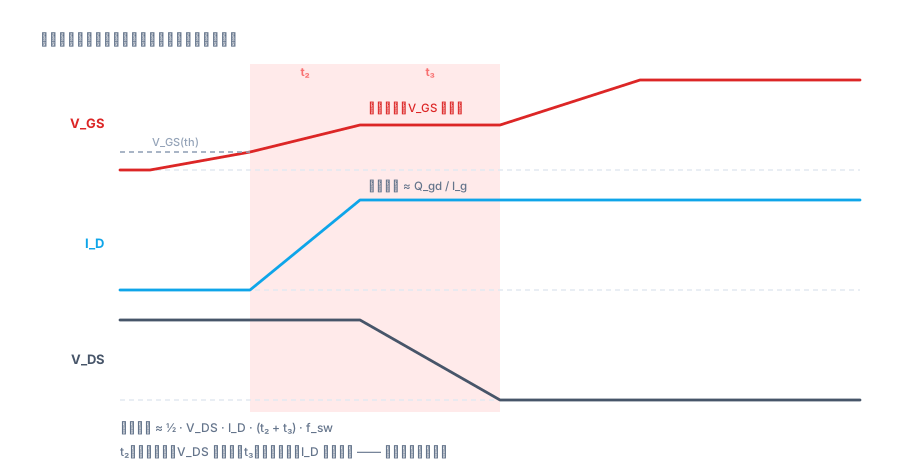
Fig. 3: During the current has already risen but the voltage has not yet fallen; during the voltage is falling while the current is already at full value — <strong>these two intervals are the main heat generators</strong>. The wider the plateau (larger , weaker drive), the greater the dissipation.
A Complete Worked Example
A , (at , 25 °C) part, used with , , , , , , , 25 °C ambient, and :
First guess :
Total is about , so .
This is lower than the assumed 100 °C, so the assumption was conservative — recalculate with 67.8 °C: , , total , . One more iteration converges to <strong>about 64 °C</strong>.
<strong>The iteration itself matters more than the formula</strong>: using the 25 °C value of 5 mΩ directly would underestimate loss by 20%–40%.
Going the Other Way: How Much Current Can This Part Actually Carry?
It is rated 60 A, but the real limit is junction temperature. With , , :
At , , giving .
<strong>Rated 60 A, can actually carry only about 20 A continuously</strong> — the entire difference is in the thermal resistance. This is the first intuition to build when reading a datasheet.
4. How to Read a Datasheet: Three Things to Read, Three to Ignore
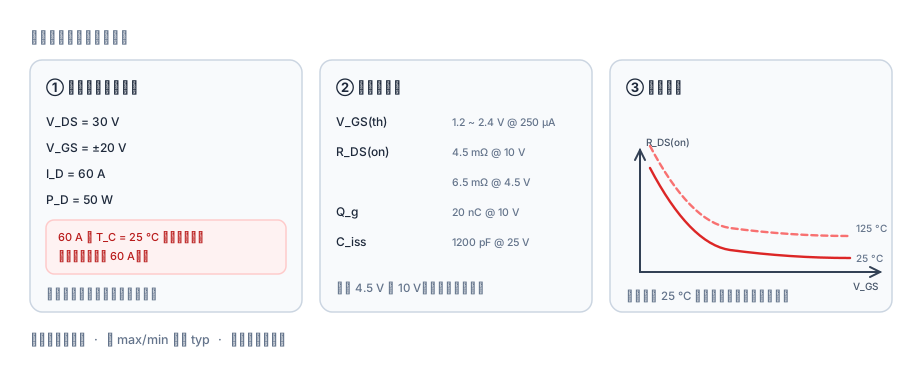
① Read the Conditions Column, Not a Number Standing Alone
In the same table, "60 A" for <code>I_D = 60 A</code> is usually next to <code>T_C = 25 °C</code> (case temperature, not ambient), and <code>R_DS(on) = 5 mΩ</code> sits next to <code>V_GS = 10 V, I_D = 20 A, T_j = 25 °C</code>. <strong>Change the conditions and the number can differ by a factor of two.</strong>
For a few high-frequency parameters specifically:
| Parameter | Typical datasheet entry | What to watch |
|---|---|---|
| 1.2 V (min) / 2.4 V (max) @ | This is "barely conducting," not the drive voltage. Logic-level parts need 4.5 V drive | |
| 4.5 mΩ (typ) @ ; 6.5 mΩ @ | Read both rows! With insufficient drive voltage, resistance basically doubles; and both are still at 25 °C | |
| 20 nC @ | Determines drive current and drive loss; changes with | |
| @ , 1 MHz | Small-signal test values that vary dramatically with ; <strong>do not directly use them to compute switching time</strong> — is more reliable | |
| Single-pulse avalanche energy | Survives inductive turn-off; it is not a guarantee that "it won't blow up no matter what" | |
| / | Often with conditions like "1 in², 2 oz copper" | If the PCB copper area changes, thermal resistance changes — measure on your own board |
② Read max/min, Not Just typ
- Designing for <strong>loss and thermals</strong>: use <strong>max</strong> (typically 1.3–1.6× the typ value);
- Designing the <strong>drive level</strong>: use <strong>max</strong> (the worst-case part is hardest to turn on);
- Judging <strong>batch consistency</strong>: look at the min/max span; a wide span means process spread, so leave enough design margin;
- <strong>typ is only a reference for "this batch, this temperature, this test condition"</strong> and cannot be treated as a design guarantee.
③ Read the Curves, Not Single Points
The curves in the back half of the datasheet carry the real information:
- <strong>Output characteristic –</strong>: read the linear-region slope (which is ), the saturation current, and each step;
- <strong>Transfer characteristic –</strong>: read the starting point and the slope (which is ); <strong>note the curve is at 25 °C — at 125 °C the whole curve shifts left</strong> ( drops);
- <strong>–</strong>: read the high-temperature coefficient directly — more accurate than using the rule of thumb;
- <strong>Capacitance–</strong>: soars at low ; this is the root of Miller plateau and dv/dt runaway;
- <strong>Gate charge –</strong>: the plateau is the Miller charge , and <strong>switching time ≈ </strong>;
- <strong>SOA (safe operating area)</strong>: only this chart decides whether the part survives pulsed operation;
- <strong>Transient thermal impedance </strong>: thermal behavior under single-pulse or short-duration overload — read together with the SOA.
<strong>The "three things to ignore"</strong>: numbers without conditions, typ treated as max, and 25 °C curves extrapolated directly to high-temperature performance.
5. Six Practical Notes
- <strong>The absolute maximum for is usually ±20 V, and only ±12 V on some parts</strong>. With long gate traces and aggressive drive, ringing can easily blow past this — add a series , a TVS or clamp diode; don't skip them.
- <strong>Do not use as the drive voltage</strong>. Use the test voltage for in the datasheet as the drive voltage: if a part is specified at 4.5 V, don't force-drive it with 3.3 V.
- <strong> has a positive temperature coefficient, and the 25 °C value is the most optimistic</strong>. At 100 °C estimate 1.4–1.6×; near 150 °C it approaches 2×.
- <strong>The rated is a package/junction-temperature limit, not the current you can use continuously</strong>. Work backward from , , and , and it is often only one-third of the rated value.
- <strong>Miller capacitance drives every "switching too fast" problem</strong>: excessive dv/dt → shoot-through, EMI violations, spurious gate turn-on. The larger , the more you should slow the drive.
- <strong>The body diode's and are often ignored</strong>. In hard switching and synchronous rectification, reverse recovery creates extra current spikes and losses — the culprit behind many cases of "the numbers are right but it still runs hot."
Small Exercises for Yourself
- A part with is driven from 3.3 V logic, so . If , estimate ; what is it with 10 V drive ()? By what factor do they differ?
- Using the Section 3 parameters, raise from 100 kHz to 500 kHz, recalculate and , and see when switching loss starts to "dominate" the total loss.
- Open the datasheet of any MOSFET you have on hand and do one thing: <strong>find the "conditions" column on the row</strong>, confirm what and it specifies, then check whether the curves include an – plot.
One-sentence summary: <strong>the threshold decides whether it conducts, the overdrive decides how well it conducts, decides how hard switching is, and decides how much current you can actually use</strong>. Every number in a datasheet must be read together with the conditions next to it.